Custom Theme, Page Builder or Headless? Choosing a WordPress Architecture
Three very different ways to build on WordPress, each with real strengths and costs that show up later. How we help clients choose, and the hybrid most of them end up with.
“We want it on WordPress” is a reasonable starting point, but it is not an architecture decision. WordPress can power a site in three very different ways: a custom theme built for your content, a page builder layered on top of a general-purpose theme, or a headless setup where WordPress manages content and a separate application renders the front end. Each has real strengths. Each also has costs that tend to appear a year or two after launch. Here is how we think about the choice.
Option one: a custom theme
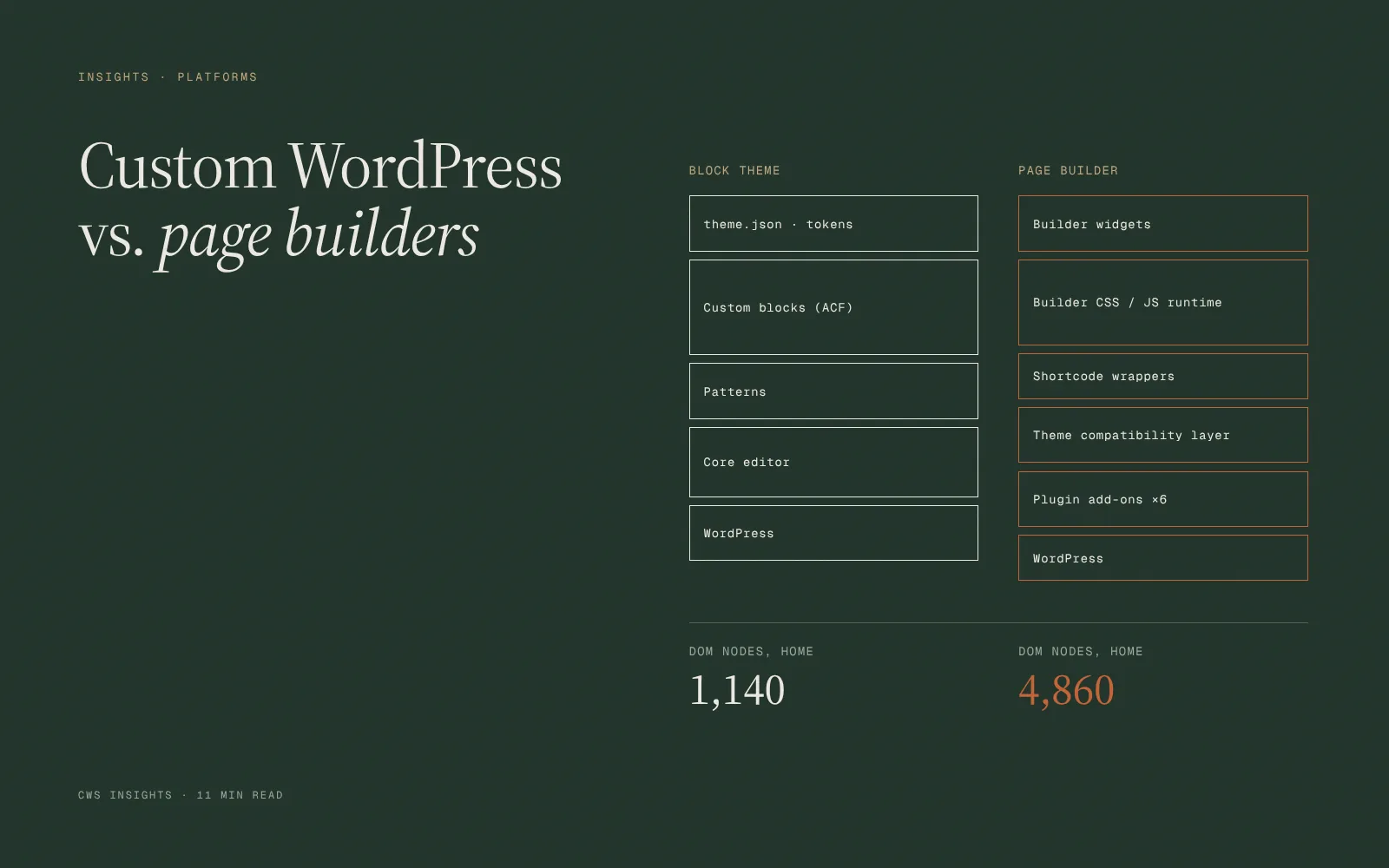
A custom theme is built specifically for your site. Templates, blocks and fields are designed around your content, and editors work in the WordPress block editor with a defined set of components. On our projects, that typically means custom Gutenberg blocks with fields managed through Advanced Custom Fields or native block attributes.
Where it works well: most marketing sites, professional services firms, real estate and B2B companies. Pages load quickly because the theme only ships the code it needs. Editors get flexibility within guardrails, so pages stay on brand even after the agency has left. The code is easier to maintain because there are fewer third-party dependencies.
The trade-offs: a custom theme costs more up front than a page builder. When marketing wants a layout that no existing block supports, a developer has to build it. For organizations that change their pages constantly and experimentally, that can feel restrictive.
Option two: a page builder
Page builders such as Elementor, Divi or Beaver Builder let editors design pages visually, dragging sections and widgets into place without writing code. They are extremely popular for good reasons.
Where they work well: small businesses that need a capable site quickly and on a modest budget, teams who want full control over layout without depending on a developer, and landing pages that change often. A good designer working within a well-configured page builder can produce a solid site.
The trade-offs: page builders tend to produce heavier pages, with more markup, CSS and JavaScript than a hand-built theme. That can be managed, but it takes discipline. Unlimited layout freedom also means unlimited room for inconsistency; after a few years of edits by different people, many page builder sites drift away from their original design. Content is stored in builder-specific formats, which can make future migrations harder. And because the builder sits at the center of the site, plugin updates carry more risk.
We do build with Elementor when it fits the client and budget, and we configure it carefully: a limited global style system, restricted widgets, and saved templates for common page types. That gets most of the speed and consistency benefits of a custom theme while preserving visual editing.
Option three: headless WordPress
In a headless setup, WordPress is used only to manage content. A separate front end, often built with a JavaScript framework such as Next.js, pulls content through the WordPress REST API or GraphQL and renders the site.
Where it works well: organizations publishing the same content to multiple destinations, such as a website, a mobile app and in-store screens; products where the website is tightly integrated with a custom application; and teams that already have front-end engineers who prefer modern JavaScript tooling.
The trade-offs: headless roughly doubles the number of systems you maintain. Many familiar WordPress features, including previews, some SEO plugins, forms and certain editor conveniences, need to be rebuilt or reconnected. Hosting becomes more complex. Most importantly, you need developers who can maintain both halves. For a typical marketing site, in our experience, the performance gains do not justify that cost, because a well-built custom theme is already fast.
How the three compare in practice
- Up-front cost: page builder lowest, custom theme moderate, headless highest.
- Editing experience: page builder most flexible, custom theme structured but simple, headless depends entirely on how it is built.
- Performance: custom theme and headless both strong when built well; page builders need careful configuration.
- Long-term maintenance: custom theme lowest effort, page builder moderate, headless highest.
- Dependence on developers: page builder least, custom theme moderate, headless most.
Questions that usually settle it
Who will edit the site, and how often? If a marketing coordinator updates pages weekly and needs to launch new campaign pages without help, structured blocks or a carefully configured page builder both work. If editors rarely touch layout, a custom theme is almost always the better long-term investment.
Does content need to appear anywhere other than the website? If not, headless is probably solving a problem you do not have.
What does the site need to connect to? Complex integrations, such as a property availability feed, a quoting tool or a customer portal, often push toward a custom theme with embedded applications, which gives you modern interactivity where it matters without making the whole site headless.
Who maintains it in three years? This is the question most people skip. If your internal team is small and your agency relationship may change, choose the architecture that the widest pool of competent developers can support.
The hybrid most clients end up with
For most of our WordPress clients, the answer is a custom theme built on the block editor, with a well-designed library of blocks that covers the layouts marketing actually needs. Where a site needs genuinely interactive features, such as a stacking plan, a filterable archive or a calculator, we build those as small React applications inside the theme. The site stays simple to edit and host, and the complex parts get the engineering they deserve.
Page builders remain a sensible choice for smaller budgets and teams who prize visual control. Headless is the right call for a minority of projects with multi-channel content or deep application integration. The mistake is choosing any of them for the wrong reason, usually because a competitor uses it or because it sounded modern in a sales meeting.
A note on rebuilding
If you already have a WordPress site that feels slow or fragile, a full rebuild is not always required. Sometimes a performance audit, plugin cleanup and a modest set of new blocks buys several more good years. We would rather tell you that than sell a rebuild you do not need.